


6.1.2.100. VMAuthenticate (dialplan application)
VMAuthenticate
The VMAuthenticate is similar to the Authenticate application. It can be used in all scenarios where you can use the Authenticate application.
VMAuthenticate is used to authenticate certain user and grant him access to some dialplan. The main difference between the two applications is that the VMAuthenticate uses the voicemail configuration for source of passwords, as the Authenticate uses external file. Due to the syntax of voicemail.conf, VMAuthenticate supports different contexts, usernames (mailboxes) and password to it. This differs the VMAuthenticate application from Authenticate.
Basically the VMAuthenticate is the authenticate algorithm of the VoiceMailMain application. You can set VMAuthenticate for certain user (mailbox) only or for all mailboxes in certain voicemail context. If you do not specify a target mailbox number, the VMAuthenticate application will set the variable AUTH_MAILBOX with value the mailbox identification number (that the user inputed) upon successful authentication process.
The VMAuthenticate can be used in order to grant access to internal dialplan of certain Asterisk server to remote caller. You can achieve this by creating new voicemail context for fake voicemail boxes.
For each remote user who should have access to internal dialplan you can create fake mailbox with mailbox number the callerID of the user. Then you can set some password to his account (the password will be valid only for his certain mailbox / callerID).
In the dialplan you should execute the VMAuthenticate with certain mailbox number and context. If the user inputs valid password the dialplan will continue its execution and you can set him a
DISA for example. The syntax of the VMAuthenticate application will be explained below.
VMAuthenticate application can be used with the following syntax:
VMAuthenticate() - if you use VMAuthenticate with no parameters, the application will prompt the user for a mailbox number and a password. Once the user inputs the data VMAuthenticate will check for the inputed mailbox number and password in context default. The user will hear all prompts (such as vm-intro, vm-password, vm-login, etc) which are typical for VoiceMail application.
VMAuthenticate(mailbox) - if you use VMAuthenticate with parameter for mailbox, the application will prompt the user only for password. Once the user inputs the data VMAuthenticate will check for the mailbox number specified as parameter in the default context and the inputed by the user password in context default. The user will hear all prompts (such as vm-intro, vm-password, vm-login, etc) which are typical for VoiceMail application.
VMAuthenticate(@context) - if you use VMAuthenticate with with parameter for mailbox context (this syntax is as follows <@>CONTEXT), the application will prompt the user for a mailbox number and a password. Once the user inputs the data VMAuthenticate will check for the inputed mailbox number and password in context specified as parameter. The user will hear all prompts (such as vm-intro, vm-password, vm-login, etc) which are typical for VoiceMail application.
VMAuthenticate(mailbox@context) - if you use VMAuthenticate with with parameters for mailbox number and context (this syntax is as follows MAILBOX<@>CONTEXT), the application will prompt the user for password. Once the user inputs the data VMAuthenticate will check the inputed password against the password for the mailbox number at the specified context. The user will hear all prompts (such as vm-intro, vm-password, vm-login, etc) which are typical for VoiceMail application.
VMAuthenticate([mailbox][@context]|options) - you can use VMAuthenticate with some additional options which will change the default behavior of the application, each of the syntaxes above supports these. The options themselves will be described below.
VMAuthenticate options:
s - If you add the 's' char at the options location in the syntax the application will skip playing the initial prompts.
We will create the following setup:
Several users will be able to dial the internal numbers of certain company. The user's callerIDs are as following: 200100200, 200100201, 200100202 and 200100203.
Those users will dial a certain DID which is terminated on our server (for example via a PRI). For our example the DID will be 300400500.
First we will create new context in voicemail.conf (located by default at /etc/asterisk/voicemail.conf).
In the context (named vmauth for example) we will create some mailboxes with identification numbers as the callerID of the users. Here is the sample:
Then we will add the needed dialplan within our extensions.conf (located by default at /etc/asterisk/extensions.conf). For example the incoming calls will be on a certain DID (300400500).
In this way if you receive a call within the zaptel-incoming context on 300400500 DID, the user will try to authenticate with his callerID as mailbox and inputed password. If the user is from different callerID than the included in the vmauth, he will be prompted for password but he will never be able to authenticate.
If user with callerIDs 20010020(0,1,2 or 3) inputs an invalid password he will be prompted for password again (the maximum reauthenticate cycles are configured within the voicemail configuration with maxlogins setting). When a user with those callerID inputs a valid password (for his account) he will be able to dial internal extension 101, 102, 103, 104 and so on.
Here we will dial the extension through our Zoiper softphone:
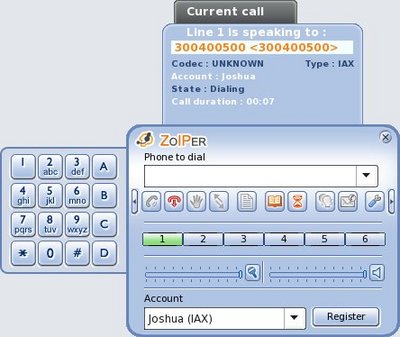
Here is the result of the dialplan execution:
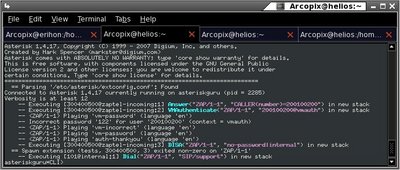
Note that the user has inputed an invalid password in his first attempt. After he inputed the correct password the user was routed to the internal context.
Links:
General Information:
The VMAuthenticate is similar to the Authenticate application. It can be used in all scenarios where you can use the Authenticate application.
VMAuthenticate is used to authenticate certain user and grant him access to some dialplan. The main difference between the two applications is that the VMAuthenticate uses the voicemail configuration for source of passwords, as the Authenticate uses external file. Due to the syntax of voicemail.conf, VMAuthenticate supports different contexts, usernames (mailboxes) and password to it. This differs the VMAuthenticate application from Authenticate.
Basically the VMAuthenticate is the authenticate algorithm of the VoiceMailMain application. You can set VMAuthenticate for certain user (mailbox) only or for all mailboxes in certain voicemail context. If you do not specify a target mailbox number, the VMAuthenticate application will set the variable AUTH_MAILBOX with value the mailbox identification number (that the user inputed) upon successful authentication process.
Exemplary usage:
The VMAuthenticate can be used in order to grant access to internal dialplan of certain Asterisk server to remote caller. You can achieve this by creating new voicemail context for fake voicemail boxes.
For each remote user who should have access to internal dialplan you can create fake mailbox with mailbox number the callerID of the user. Then you can set some password to his account (the password will be valid only for his certain mailbox / callerID).
In the dialplan you should execute the VMAuthenticate with certain mailbox number and context. If the user inputs valid password the dialplan will continue its execution and you can set him a
DISA for example. The syntax of the VMAuthenticate application will be explained below.
Syntax:
VMAuthenticate application can be used with the following syntax:
VMAuthenticate() - if you use VMAuthenticate with no parameters, the application will prompt the user for a mailbox number and a password. Once the user inputs the data VMAuthenticate will check for the inputed mailbox number and password in context default. The user will hear all prompts (such as vm-intro, vm-password, vm-login, etc) which are typical for VoiceMail application.
VMAuthenticate(mailbox) - if you use VMAuthenticate with parameter for mailbox, the application will prompt the user only for password. Once the user inputs the data VMAuthenticate will check for the mailbox number specified as parameter in the default context and the inputed by the user password in context default. The user will hear all prompts (such as vm-intro, vm-password, vm-login, etc) which are typical for VoiceMail application.
VMAuthenticate(@context) - if you use VMAuthenticate with with parameter for mailbox context (this syntax is as follows <@>CONTEXT), the application will prompt the user for a mailbox number and a password. Once the user inputs the data VMAuthenticate will check for the inputed mailbox number and password in context specified as parameter. The user will hear all prompts (such as vm-intro, vm-password, vm-login, etc) which are typical for VoiceMail application.
VMAuthenticate(mailbox@context) - if you use VMAuthenticate with with parameters for mailbox number and context (this syntax is as follows MAILBOX<@>CONTEXT), the application will prompt the user for password. Once the user inputs the data VMAuthenticate will check the inputed password against the password for the mailbox number at the specified context. The user will hear all prompts (such as vm-intro, vm-password, vm-login, etc) which are typical for VoiceMail application.
VMAuthenticate([mailbox][@context]|options) - you can use VMAuthenticate with some additional options which will change the default behavior of the application, each of the syntaxes above supports these. The options themselves will be described below.
VMAuthenticate options:
s - If you add the 's' char at the options location in the syntax the application will skip playing the initial prompts.
Sample configuration:
We will create the following setup:
Several users will be able to dial the internal numbers of certain company. The user's callerIDs are as following: 200100200, 200100201, 200100202 and 200100203.
Those users will dial a certain DID which is terminated on our server (for example via a PRI). For our example the DID will be 300400500.
First we will create new context in voicemail.conf (located by default at /etc/asterisk/voicemail.conf).
In the context (named vmauth for example) we will create some mailboxes with identification numbers as the callerID of the users. Here is the sample:
[general]
format=wav49|gsm|wav
serveremail=asterisk
maxsilence=5
silencethreshold=128
maxlogins=2
emaildateformat=%A, %B %d, %Y at %r
sendvoicemail=yes
[zonemessages]
eastern=America/New_York|'vm-received' Q 'digits/at' IMp
european=Europe/Copenhagen|'vm-received' a d b 'digits/at' HM
[default]
[vmauth]
200100200 => 1234, johnDow0, johnDow0@asteriskguru.com
200100201 => 2345, johnDow1, johnDow1@asteriskguru.com
200100202 => 3456, johnDow2, johnDow2@asteriskguru.com
200100203 => 5678, johnDow3, johnDow3@asteriskguru.com
format=wav49|gsm|wav
serveremail=asterisk
maxsilence=5
silencethreshold=128
maxlogins=2
emaildateformat=%A, %B %d, %Y at %r
sendvoicemail=yes
[zonemessages]
eastern=America/New_York|'vm-received' Q 'digits/at' IMp
european=Europe/Copenhagen|'vm-received' a d b 'digits/at' HM
[default]
[vmauth]
200100200 => 1234, johnDow0, johnDow0@asteriskguru.com
200100201 => 2345, johnDow1, johnDow1@asteriskguru.com
200100202 => 3456, johnDow2, johnDow2@asteriskguru.com
200100203 => 5678, johnDow3, johnDow3@asteriskguru.com
Then we will add the needed dialplan within our extensions.conf (located by default at /etc/asterisk/extensions.conf). For example the incoming calls will be on a certain DID (300400500).
[general]
static=yes
autofallthrough=no
writeprotect=yes
[globals]
[zaptel-incoming]
exten => 300400500,1,Answer()
exten => 300400500,n,VMAuthenticate(${CALLER(num)}@vmauth)
exten => 300400500,n,DISA(no-password|internal)
exten => 300400500,n,HangUp()
[internal]
exten => 101,1,Dial(SIP/support)
exten => 101,n,HangUp()
exten => 102,1,Dial(SIP/support-lvl2)
exten => 102,n,HangUp()
exten => 103,1,Dial(IAX2/sandra&IAX2/monica)
exten => 103,n,HangUp()
exten => 104,1,Dial(SIP/admins)
exten => 104,n,HangUp()
static=yes
autofallthrough=no
writeprotect=yes
[globals]
[zaptel-incoming]
exten => 300400500,1,Answer()
exten => 300400500,n,VMAuthenticate(${CALLER(num)}@vmauth)
exten => 300400500,n,DISA(no-password|internal)
exten => 300400500,n,HangUp()
[internal]
exten => 101,1,Dial(SIP/support)
exten => 101,n,HangUp()
exten => 102,1,Dial(SIP/support-lvl2)
exten => 102,n,HangUp()
exten => 103,1,Dial(IAX2/sandra&IAX2/monica)
exten => 103,n,HangUp()
exten => 104,1,Dial(SIP/admins)
exten => 104,n,HangUp()
In this way if you receive a call within the zaptel-incoming context on 300400500 DID, the user will try to authenticate with his callerID as mailbox and inputed password. If the user is from different callerID than the included in the vmauth, he will be prompted for password but he will never be able to authenticate.
If user with callerIDs 20010020(0,1,2 or 3) inputs an invalid password he will be prompted for password again (the maximum reauthenticate cycles are configured within the voicemail configuration with maxlogins setting). When a user with those callerID inputs a valid password (for his account) he will be able to dial internal extension 101, 102, 103, 104 and so on.
Here we will dial the extension through our Zoiper softphone:
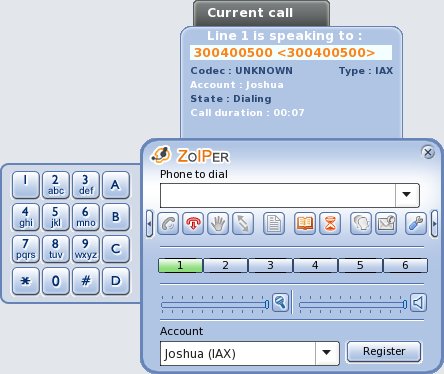
Here is the result of the dialplan execution:
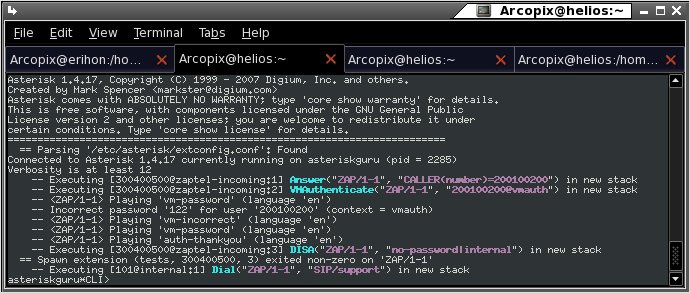
Note that the user has inputed an invalid password in his first attempt. After he inputed the correct password the user was routed to the internal context.
Links:
| Add Comment |
Latest Headlines:
-
T.38 faxing with Zoiper 2.15 is now easier than ever
section: voip software
-
Asterisk 1.4.21 Released
section: Asterisk
-
Asterisk 1.4.20 Released
section: Asterisk
-
Asterisk 1.4.20-rc2 Released
section: Asterisk
-
Asterisk 1.4.20-rc1 Now Available
section: Asterisk
- News Archives (older news)
Latest Tutorials:
-
Sending Fax from Zoiper to Zoiper using T.38
added 08/Dec/2008 18:16
-
VMAuthenticate (dialplan application)
added 01/Mar/2008 15:57
-
Siptronic ST-530
added 06/Nov/2007 17:57
-
Siemens C455 IP hardphone
added 05/Nov/2007 10:24
-
Zoiper
added 22/Oct/2007 17:53
Latest Comments:
-
https://www.imdb.com/list/ls540847699/
...
tutorial: Installation on Slackware
-
https://www.imdb.com/list/ls540841042/
...
tutorial: Installation on Slackware
-
https://m.facebook.com/media/set/?set=a....
tutorial: Installation on Slackware
-
https://m.facebook.com/media/set/?set=a....
tutorial: Installation on Slackware
-
https://bento.me/films-voir-le-royaume-d...
tutorial: Request to schedule in the past?!?!