


6.1.2.41. Math (dialplan application) - NEW
1. Math - this application allows you to perform mathematical operations with floating point
NOTE: This application is valid for Asterisk version 1.0.9 and 1.0.10.
If you are using version 1.2 or newer, then you have to know that this application is deprecated. However, if you want to use its functionality, there is a new syntax, which require the usage of the Set application. For more information click on the link - The new syntax - the MATH function.
Syntax:
List of the possible options
Purpose and usage
Prerequisites
Asterisk PBX configurations
iax.conf Configurations
extensions.conf Configurations
2. Screenshots of what you can see on your Idefisk and on the CLI of the Asterisk PBX
3. Additional information
4. Uploaded files
NOTE: This application is valid for Asterisk version 1.0.9 and 1.0.10.
If you are using version 1.2 or newer, then you have to know that this application is deprecated. However, if you want to use its functionality, there is a new syntax, which require the usage of the Set application. For more information click on the link - The new syntax - the MATH function.
Syntax:
Math(retvar,<number1><operation><number2>)
List of the possible options
retvar - this is the variable, where you would like to store the result from the mathematical operation
number1 - the first number from the equation
operation - the allowed mathematical operations are +, -, /, *, %, <, >, >=, <=, ==
number2 - the second number from the equation
number1 - the first number from the equation
operation - the allowed mathematical operations are +, -, /, *, %, <, >, >=, <=, ==
number2 - the second number from the equation
Purpose and usage
The purpose of this application is to give you the possibility to perform mathematical operations. However there is a drawback - the calculations could be only with floating point.
Fortunately in the newest version of the Asterisk the Math application is replaced with the MATH function, which gives you the chance to choose between calculation of type integer, float, hexametrical and even string.
However, this tutorial is for the those of you who are still running Asterisk versions 1.0.9. or 1.0.10 and for the Math application
Below, we will give you an example.
Fortunately in the newest version of the Asterisk the Math application is replaced with the MATH function, which gives you the chance to choose between calculation of type integer, float, hexametrical and even string.
However, this tutorial is for the those of you who are still running Asterisk versions 1.0.9. or 1.0.10 and for the Math application
Below, we will give you an example.
Prerequisites
In order to use this application you will need a working Asterisk PBX with registered users in iax.conf, sip.conf or mgcp.conf(It depends on which protocol you would like to use) and made extensions in the extensions.conf file.
To see how this application works, we recommend you to use our IAX softphone - Idefisk. You could download it from here. Please, take a look also at our tutorial - to learn how to configure it to work with the Asterisk PBX.
To see how this application works, we recommend you to use our IAX softphone - Idefisk. You could download it from here. Please, take a look also at our tutorial - to learn how to configure it to work with the Asterisk PBX.
Asterisk PBX configurations
NOTE: This is an example of what for you could use the application.
iax.conf Configurations
We need one registered user in the iax.conf file (we are going to use the IAX2 protocol). If you want to use other protocol such as SIP or MGCP, you have to do the configurations below respectively in the sip.conf or mgcp.conf.
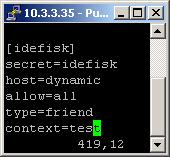
So, we have registered the user idefisk
Type=friend means that this user is allowed to make and receive calls. Host=dynamic means that the IP is not statically assigned, but dynamically through DHCP server. Allow=all means that the line, which this user will use, could support all audio codecs. Context=test - this shows that the user will be allowed to work only with the extensions in this context in the configuration file extensions.conf.
Type=friend means that this user is allowed to make and receive calls. Host=dynamic means that the IP is not statically assigned, but dynamically through DHCP server. Allow=all means that the line, which this user will use, could support all audio codecs. Context=test - this shows that the user will be allowed to work only with the extensions in this context in the configuration file extensions.conf.
extensions.conf Configurations
Now lets take a look at the extensions.conf file.
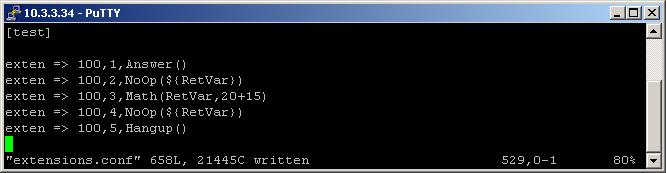
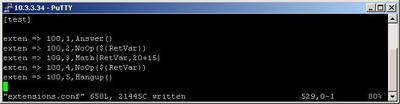
On the picture above you could see our test extensions.conf file.
So we have and extension 100, which we will use for the test.
First we use the Answer application to answer the channel.
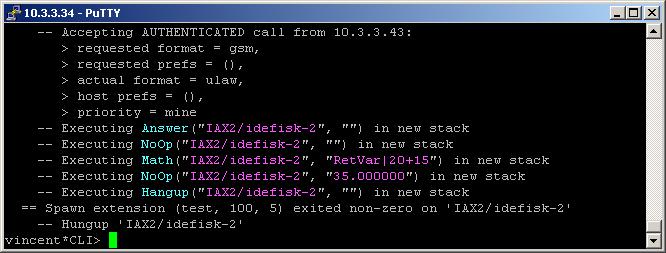
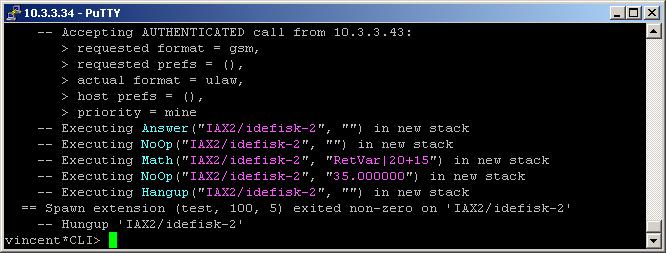
The execution will continue with the next priority extension and the NoOp application. We will use it just to show you that nothing is stored in our arbitrary chosen variable - RetVar
Now, lets make a calculation using the Math application. The operation will be SUM. For the purpose we the following argument in the parentheses:
The result from the mathematical operation 20+15 will be stored in the RetVar variable.
Once again we will use the NoOp application to verify that the result is really stored in the variable.
We showed you only one of the possible mathematic operations. The other options are:
NOTE:Please, pay attention that when you call back variables for example in the NoOp application you have to use the following syntax:
But if you set a variable, for example in an application like the Math one, then you have to type the variable with the following syntax:
Finally, in order to be sure that the Asterisk PBX will hang up the line, when the conversation is over, it is a good idea to make an extension for hanging up the line using the Hangup application.
So we have and extension 100, which we will use for the test.
First we use the Answer application to answer the channel.
The execution will continue with the next priority extension and the NoOp application. We will use it just to show you that nothing is stored in our arbitrary chosen variable - RetVar
Now, lets make a calculation using the Math application. The operation will be SUM. For the purpose we the following argument in the parentheses:
(RetVar,20+15)
The result from the mathematical operation 20+15 will be stored in the RetVar variable.
Once again we will use the NoOp application to verify that the result is really stored in the variable.
We showed you only one of the possible mathematic operations. The other options are:
Math(RetVar,3*10)
Math(RetVar,10/5)
Math(RetVar,20-10)
Math(RetVar,10-200)
Math(RetVar,1<20)
Math(RetVar,1>=20)
Math(RetVar,101>20)
Math(RetVar,1==20)
Math(RetVar,20<=20)
Math(RetVar,123%16)
Math(RetVar,1%16)
Math(RetVar,10/5)
Math(RetVar,20-10)
Math(RetVar,10-200)
Math(RetVar,1<20)
Math(RetVar,1>=20)
Math(RetVar,101>20)
Math(RetVar,1==20)
Math(RetVar,20<=20)
Math(RetVar,123%16)
Math(RetVar,1%16)
NOTE:Please, pay attention that when you call back variables for example in the NoOp application you have to use the following syntax:
${VARIABLE}
But if you set a variable, for example in an application like the Math one, then you have to type the variable with the following syntax:
Math(VARIABLE,.....)
Finally, in order to be sure that the Asterisk PBX will hang up the line, when the conversation is over, it is a good idea to make an extension for hanging up the line using the Hangup application.
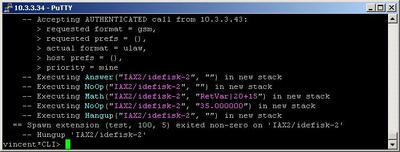
2. Screenshots of what you can see on your Idefisk and on the CLI of the Asterisk PBX
3. Additional information
More information about the extensions.conf file you could find here.
For more information about the iax.conf file, check here.
The application is tested with our IAX softphone Idefisk. You could download it from here. A manual about this softphone could be found here.
If you would like to test the application with the SIP protocol you could take a look at our tutorials about the SIP Softphones, where you could pick up the one which suits your needs and learn how to configure it to work with the Asterisk PBX
For more information about the iax.conf file, check here.
The application is tested with our IAX softphone Idefisk. You could download it from here. A manual about this softphone could be found here.
If you would like to test the application with the SIP protocol you could take a look at our tutorials about the SIP Softphones, where you could pick up the one which suits your needs and learn how to configure it to work with the Asterisk PBX
4. Uploaded files

| Add Comment |
Latest Headlines:
-
T.38 faxing with Zoiper 2.15 is now easier than ever
section: voip software
-
Asterisk 1.4.21 Released
section: Asterisk
-
Asterisk 1.4.20 Released
section: Asterisk
-
Asterisk 1.4.20-rc2 Released
section: Asterisk
-
Asterisk 1.4.20-rc1 Now Available
section: Asterisk
- News Archives (older news)
Latest Tutorials:
-
Sending Fax from Zoiper to Zoiper using T.38
added 08/Dec/2008 18:16
-
VMAuthenticate (dialplan application)
added 01/Mar/2008 15:57
-
Siptronic ST-530
added 06/Nov/2007 17:57
-
Siemens C455 IP hardphone
added 05/Nov/2007 10:24
-
Zoiper
added 22/Oct/2007 17:53
Latest Comments:
-
https://m.facebook.com/media/set/?set=a....
tutorial: Installation on Slackware
-
https://m.facebook.com/media/set/?set=a....
tutorial: Installation on Slackware
-
https://m.facebook.com/media/set/?set=a....
tutorial: Installation on Slackware
-
https://github.com/SB01-Civil-War-2024-S...
tutorial: General Installation
-
https://bento.me/voir-challengers-en-str...
tutorial: Configuring IP Phones for use with Asterisk