


6.1.2.89. StopMonitor (dialplan application)
1. StopMonitor - this application allows you to stop the action of the Monitor application.
NOTE: This application is valid for Asterisk version 1.0.9 and above.
Syntax:
Purpose and usage
Prerequisites
Asterisk PBX configurations
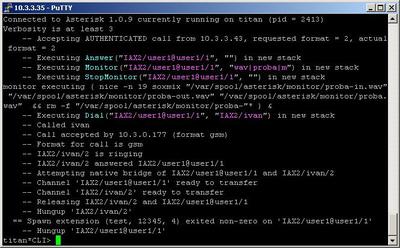
2. Screenshots of what you can see on the CLI of the Asterisk PBX
3. Additional information
NOTE: This application is valid for Asterisk version 1.0.9 and above.
Syntax:
StopMonitor() ;There are no arguments for this application
Purpose and usage
Prerequisites
To use this application you need a working Asterisk PBX with registered users in iax.conf, sip.conf or mgcp.conf(It depends on which protocol you would like to use) and made extensions.
To see how the application works we recommend to use our IAX softphone Idefisk. You can download it from here. Please also read our tutorial to learn how to configure it to work with Asterisk PBX.
To see how the application works we recommend to use our IAX softphone Idefisk. You can download it from here. Please also read our tutorial to learn how to configure it to work with Asterisk PBX.
Asterisk PBX configurations
NOTE: This is only an example of what for you can use this application. Of course you can use it and for other things.
We need two registered user in iax.conf file. This is because we are going to use the IAX2 protocol. If you want to use other protocol such as SIP or MGCP, you have to do the configurations below respectively in sip.conf or mgcp.conf.
We need two registered user in iax.conf file. This is because we are going to use the IAX2 protocol. If you want to use other protocol such as SIP or MGCP, you have to do the configurations below respectively in sip.conf or mgcp.conf.
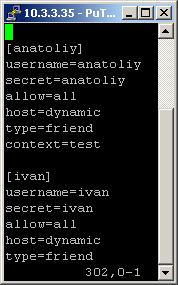
So, we have registered the user anatoliy and ivan
Type=friend means that this user can make and receive calls. Host=dynamic means that the IP is not static but dynamic through a DHCP server. Allow=all means that the line which this user will use, could support all audio codecs. Context=test - this shows that this user is working with the extensions in this context of the configuration file extensions.conf.
Type=friend means that this user can make and receive calls. Host=dynamic means that the IP is not static but dynamic through a DHCP server. Allow=all means that the line which this user will use, could support all audio codecs. Context=test - this shows that this user is working with the extensions in this context of the configuration file extensions.conf.
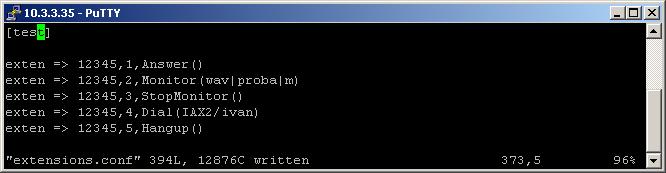
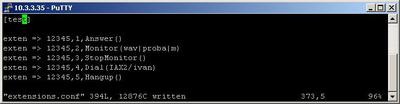
On the picture above you can see our extensions.conf file.
So, in our example when somebody dials 12345, the call will be answered by the Answer application. The next executed extension will be the one which contains the Monitor application. As you can see the desired name for the audio file is proba.
Now, the next extension will execute the application StopMonitor. It will stop the action of the Monitor application and the conversation won’t be recorded.
Then we have the extension with the Dial application. Thanks to it, the call will be connected to the user ivan through the IAX2 channel.
In order to be sure, that the Asterisk PBX will hang up the line after the conversation is over, it is always a good idea to make an extension for hanging up.
So, in our example when somebody dials 12345, the call will be answered by the Answer application. The next executed extension will be the one which contains the Monitor application. As you can see the desired name for the audio file is proba.
Now, the next extension will execute the application StopMonitor. It will stop the action of the Monitor application and the conversation won’t be recorded.
Then we have the extension with the Dial application. Thanks to it, the call will be connected to the user ivan through the IAX2 channel.
In order to be sure, that the Asterisk PBX will hang up the line after the conversation is over, it is always a good idea to make an extension for hanging up.
2. Screenshots of what you can see on the CLI of the Asterisk PBX
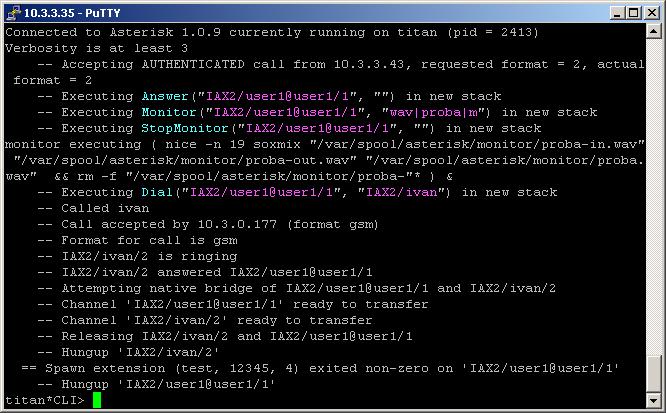
3. Additional information
For more information about extensions.conf you can check here.
For more information about iax.conf you can check here.
This application is tested with our IAX softphone Idefisk. You can download it from here. For more information about this softphone please read our tutorial.
If you would like to test this application with the SIP channel you can read our tutorials about the SIP Softphones to learn how to configure them to work with Asterisk PBX
For more information about iax.conf you can check here.
This application is tested with our IAX softphone Idefisk. You can download it from here. For more information about this softphone please read our tutorial.
If you would like to test this application with the SIP channel you can read our tutorials about the SIP Softphones to learn how to configure them to work with Asterisk PBX
| Add Comment |
Latest Headlines:
-
T.38 faxing with Zoiper 2.15 is now easier than ever
section: voip software
-
Asterisk 1.4.21 Released
section: Asterisk
-
Asterisk 1.4.20 Released
section: Asterisk
-
Asterisk 1.4.20-rc2 Released
section: Asterisk
-
Asterisk 1.4.20-rc1 Now Available
section: Asterisk
- News Archives (older news)
Latest Tutorials:
-
Sending Fax from Zoiper to Zoiper using T.38
added 08/Dec/2008 18:16
-
VMAuthenticate (dialplan application)
added 01/Mar/2008 15:57
-
Siptronic ST-530
added 06/Nov/2007 17:57
-
Siemens C455 IP hardphone
added 05/Nov/2007 10:24
-
Zoiper
added 22/Oct/2007 17:53
Latest Comments:
-
https://www.ttvets.org/forum/main/co...
tutorial: General Installation
-
https://www.ttvets.org/forum/questions-a...
tutorial: General Installation
-
<a href=\"https://mega555kf7lsmb54yd6etz...
tutorial: CALLERID(name) (dialplan function) - NEW
-
<a href=\"https://mega555kf7lsmb54yd6etz...
tutorial: CALLERID(name) (dialplan function) - NEW
-
Купить Лирику Тропика...
tutorial: DrayTek Vigor 2900V - broadband security voip router